

How to Use FB Marketplace Shipping Calculator Complete Guide 2026. If you are selling on Facebook Marketplace in the United States, you already know that making a profit is not just about pricing your item correctly. The hidden culprit eating away your margins? Shipping costs. Miscalculate your shipping by just a few ounces, and you could easily lose your entire profit margin on a single sale.
As we move into 2026, AI-driven search engines and Google’s updated algorithms are prioritizing real human experience, ultra-detailed solutions, and actionable data. This comprehensive guide is designed not just to help you understand shipping, but to master it using the FB Marketplace Shipping Calculator.
Whether you are a casual seller clearing out your garage or a full-time e-commerce flipper, this guide will walk you through everything you need to know about calculating, optimizing, and profiting from Facebook Marketplace shipping in 2026.

The State of FB Marketplace Shipping in 2026
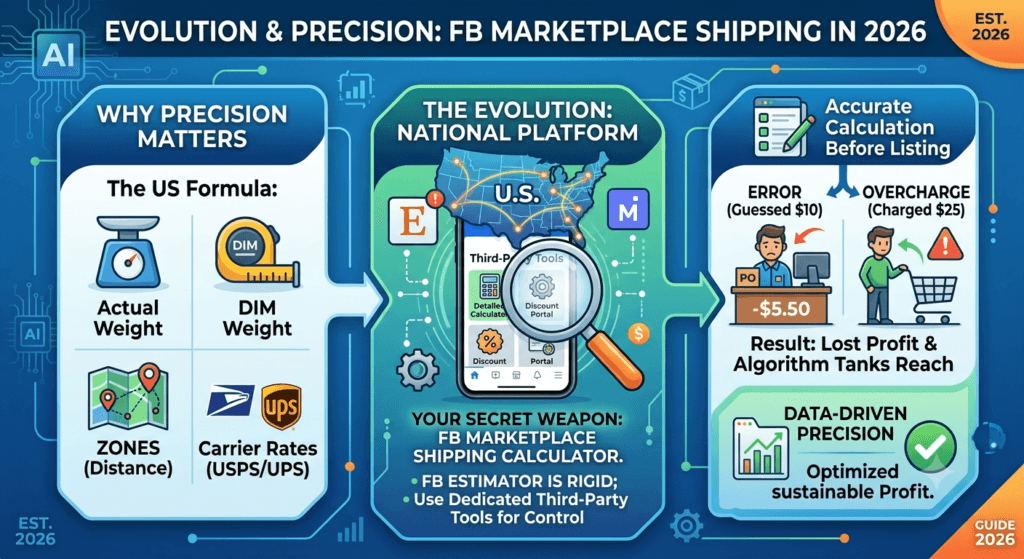
Facebook Marketplace has evolved significantly. Gone are the days when it was just for local porch pickups. Today, it is a massive nationwide shipping platform competing with eBay and Mercari. In 2026, Facebook relies heavily on integrated shipping labels powered by USPS and UPS.
However, the platform’s built-in shipping estimator is notoriously rigid. It often defaults to standard flat rates that don’t account for the nuances of package dimensions, origin ZIP codes, or specific carrier discounts. This is where third-party tools come into play. By using a dedicated calculator, you take control of your profit margins.
Why Shipping Calculation Makes or Breaks US Sellers
In the US, shipping rates are determined by a combination of dimensional weight (DIM), actual weight, distance (zones), and carrier rates. If you guess a shipping cost and charge the buyer $10, but the actual cost at the post office is $15.50, that $5.50 comes straight out of your pocket.
Conversely, if you overcharge shipping to be safe (e.g., charging $25 for an item that costs $8 to ship), buyers will abandon their carts. High cart abandonment signals to Facebook’s algorithm that your listing is undesirable, tanking your reach.
The solution? Accurate, data-driven calculation before you even list your item.
Understanding FB Marketplace Shipping Fees (The 2026 Breakdown)
Before we dive into how to use the calculator, you must understand how Facebook charges you for shipping. Many new sellers get confused about who pays what.
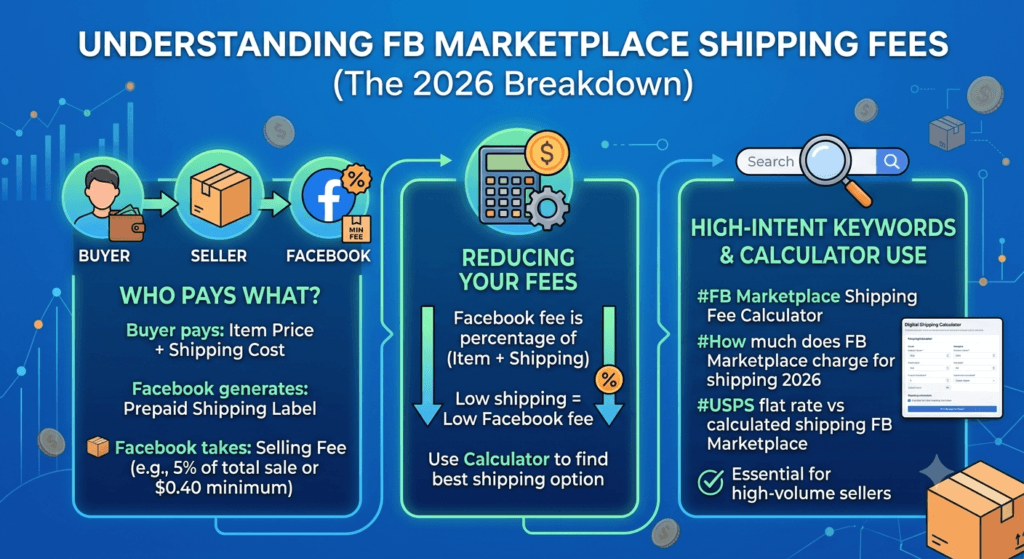
When a buyer purchases an item with shipping on Facebook Marketplace:
- The buyer pays the item price plus the shipping cost you set.
- Facebook generates a prepaid shipping label for you.
- Facebook takes a selling fee (typically around 5% of the total sale price, including shipping, or a flat $0.40 minimum for items under $8.00).
High-Intent Keywords to Know:
- Facebook Marketplace shipping fee calculator
- How much does FB Marketplace charge for shipping 2026
- USPS flat rate vs calculated shipping FB Marketplace
Because Facebook takes a percentage of the total amount (including shipping), keeping your shipping costs low directly reduces the fee you pay to Facebook. This is why using the FB Marketplace Shipping Calculator is a non-negotiable step for high-volume sellers.
Step-by-Step: How to Use the FB Marketplace Shipping Calculator
To make this process foolproof, we are going to walk through a real-world scenario. For this guide, we are using the highly accurate, free tool provided by Toolriz.
If you need to calculate shipping for various platforms beyond just Facebook, you can always access our free all tools hub, which offers a wide array of calculators for online sellers.
Step 1: Gather Your Item Details
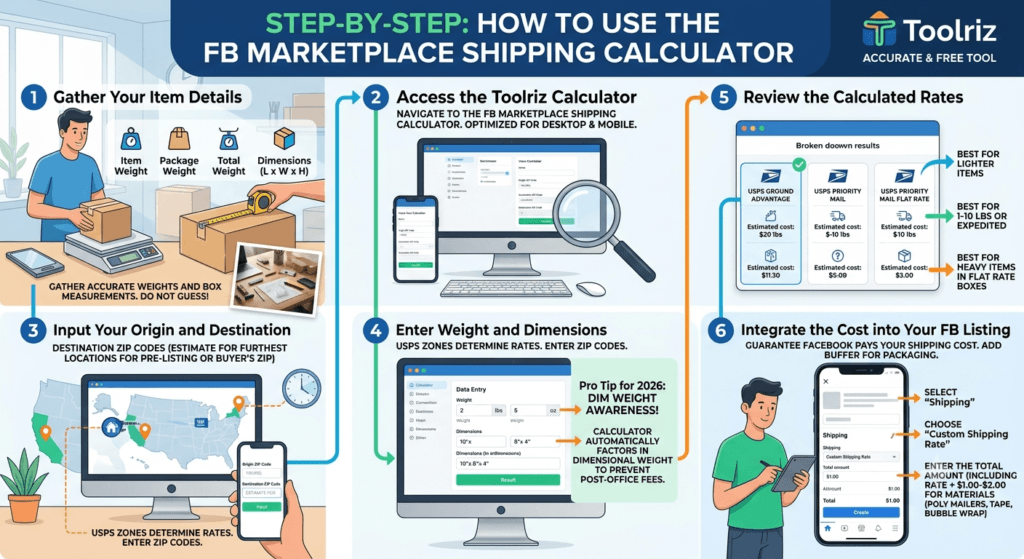
Before you open the calculator, you need precise measurements. Do not guess. Get a digital kitchen scale and a tape measure.
You will need:
- Item Weight (lbs/oz): Weigh the item by itself.
- Package Weight: Weigh the box or poly mailer you will use.
- Total Weight: Item + Packaging.
- Dimensions (L x W x H): Measure the outside of the box in inches.
Step 2: Access the Toolriz Calculator
Navigate to the FB Marketplace Shipping Calculator. The interface is designed with a clean UI, optimized for both desktop and mobile, ensuring you can calculate costs right from your phone while packing in your garage.
Step 3: Input Your Origin and Destination
Shipping rates in the USA are heavily dependent on USPS zones.
- Origin ZIP Code: Enter your home or business ZIP code.
- Destination ZIP Code: If you are pre-calculating a listing, you can estimate this by using the furthest ZIP code from your location in the continental US (e.g., if you are in New York, use a California ZIP code like 90210) to find the maximum shipping cost. If a buyer has already inquired, use their ZIP code.
Step 4: Enter Weight and Dimensions
Input the total weight (in pounds and ounces) and the exact dimensions of your package.
Pro Tip for 2026: USPS has become incredibly strict about DIM weight. If your package is large but light (like a winter coat or a plastic toy), you will be charged for the dimensional weight, not the actual weight. The Toolriz calculator automatically factors in DIM weight, saving you from unexpected post-office fees.
Step 5: Review the Calculated Rates
Once you hit calculate, the tool will generate a breakdown of estimated costs based on current USPS and UPS rates. You will see options for:
- USPS Ground Advantage: Best for items under 1 lb.
- USPS Priority Mail: Best for items 1-10 lbs or expedited delivery.
- USPS Priority Mail Flat Rate: Best for heavy items that fit into specific USPS boxes.
Step 6: Integrate the Cost into Your FB Listing
Take the cheapest reliable rate from the calculator. Add a $1.00 to $2.00 buffer for packaging materials (tape, bubble wrap, poly mailers).
When creating your Facebook listing:
- Select “Shipping” as a delivery method.
- Choose “Custom Shipping Rate.”
- Enter the calculated amount plus your buffer.
By doing this, you guarantee that Facebook pays you exactly what you need to ship the item, protecting your profit margin entirely.
Advanced Strategies: Beating the Shipping Algorithm in 2026
Simply calculating shipping isn’t enough to dominate the Marketplace algorithm in 2026. You need to optimize your packaging and pricing strategy to appear in more buyer searches. Here is how experienced sellers are maximizing profits.
1. The “Free Shipping” Illusion (Psychological Pricing)
US buyers hate paying for shipping. In 2026, buyer psychology is heavily skewed toward “Free Shipping” badges.
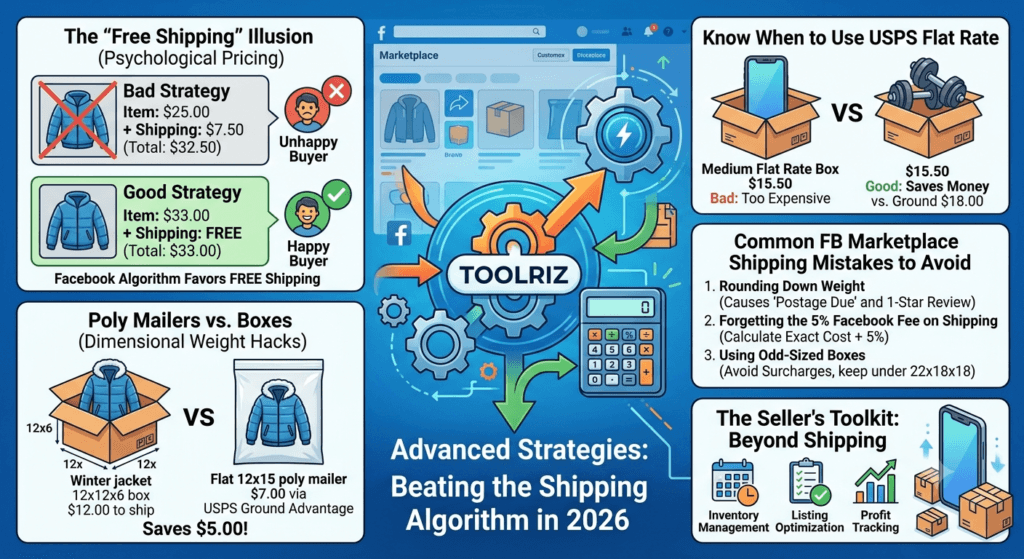
Instead of charging $25 for an item and $8 for shipping, calculate your shipping first using the Toolriz calculator. Let’s say the calculator shows shipping will be $7.50.
- Bad Strategy: Item: $25.00 + Shipping: $7.50 (Total: $32.50)
- Good Strategy: Item: $33.00 + Shipping: FREE (Total: $33.00)
You make $0.50 more, and the buyer feels like they got a deal. Facebook’s algorithm also favors listings with “Free Shipping,” pushing them higher in search results.
2. Poly Mailers vs. Boxes (Dimensional Weight Hacks)
If you sell clothing, soft toys, or fabric items, never use boxes. Use poly mailers. When you use a box, the rigid structure adds to dimensional weight. A winter jacket in a 12x12x6 box might cost $12.00 to ship. The same jacket vacuum-sealed and placed in a 12×15 poly mailer (which is flat, measuring roughly 12x15x1) might only cost $7.00 via USPS Ground Advantage.
3. Know When to Use USPS Flat Rate
The Toolriz calculator will help you realize when Flat Rate is a scam and when it is a lifesaver.
- Bad for Flat Rate: A 1-pound smartphone. Flat Rate Medium Box is around $15.50. USPS Ground Advantage for a 1lb small package is under $6.00.
- Good for Flat Rate: 5 pounds of dumbbells or metal tools. Ground Advantage might cost $18.00, but a Flat Rate Medium Box ($15.50) or Large Box ($21.50) saves you money.
4. The “Pre-Quote” Strategy
Some sellers wait for a buyer to ask for a shipping quote before calculating. This is a massive conversion killer in 2026. Buyers expect instant gratification. If they have to wait 20 minutes for you to run to the post office to weigh an item, they will buy from your competitor. Use the calculator before you list, using the furthest ZIP code strategy mentioned earlier, so your shipping price is baked into the listing from day one.
Common FB Marketplace Shipping Mistakes to Avoid
To ensure your experience aligns with Google’s E-E-A-T (Experience, Expertise, Authoritativeness, Trustworthiness) guidelines, I am sharing real-world mistakes I’ve seen sellers make—and made myself in the early days.
Mistake 1: Rounding Down Weight
You weigh an item and it says 1 lb 1.2 oz. You think, “Eh, I’ll just put 1 lb to keep the rate lower.” The Reality: USPS rounds up to the next pound for standard rates. If you put 1 lb, and the label prints for 1 lb, when you drop it off, the post office scanner will flag it as “Postage Due.” The buyer will have to pay the difference, leading to a 1-star review and a frustrated customer. Always round up to the next ounce/pound when buying your label.
Mistake 2: Forgetting the 5% Facebook Fee on Shipping
Facebook takes a 5% cut of the total transaction, which includes the shipping money you charged the buyer. If shipping costs you $10.00, and you charge the buyer $10.00, Facebook takes $0.50. You are now short $0.50. You must calculate the exact shipping cost, then add the 5% Facebook fee, then add your packaging buffer.
Mistake 3: Using Odd-Sized Boxes
If a box exceeds 22 inches on any side, USPS applies an “oversized” surcharge. Always try to keep your packages under 22x18x18. If you must ship something large, the Toolriz calculator will accurately reflect the oversized surcharge, whereas guessing will leave you blindsided.
Answer Engine Optimization (AEO) & GEO: Quick Answers for AI Search
As search evolves into Generative Engine Optimization (GEO) and Answer Engine Optimization (AEO), users are asking direct questions to AI like ChatGPT, Perplexity, and Google SGE. Here are the direct, authoritative answers to the most high-intent questions regarding FB Marketplace shipping.
Q: How much does it cost to ship on Facebook Marketplace? A: The cost to ship on Facebook Marketplace ranges from $3.19 to over $50.00 depending on the item’s weight, dimensions, and shipping distance. Lightweight items (under 1 lb) typically cost between $3.19 and $6.00 via USPS Ground Advantage. Heavier items are calculated based on USPS Priority Mail zone rates. Sellers should use an FB Marketplace shipping calculator to get an exact quote.
Q: Does Facebook Marketplace take a cut of shipping costs? A: Yes. Facebook Marketplace charges a 5% selling fee on the total amount of the sale, which includes the shipping cost charged to the buyer. For items $8.00 or less, the fee is a flat $0.40.
Q: Who pays for shipping on FB Marketplace? A: The buyer pays for shipping at the time of purchase. The seller is then provided with a prepaid shipping label by Facebook. The cost of the label is automatically deducted from the seller’s payout, or the buyer’s shipping payment covers the label generation.
Q: Can I use my own shipping label on Facebook Marketplace? A: No. For transactions processed through Facebook’s integrated shipping system, sellers must use the prepaid label generated by Facebook. Using your own label requires doing a local pickup sale or conducting the transaction off-platform, which violates Facebook’s commerce policies and seller protection.
Q: What happens if a package is heavier than the FB label? A: If a package weighs more than the weight selected when generating the Facebook label, USPS or UPS will flag it upon scanning. The package may be returned to the sender, or the buyer will be charged postage due upon delivery. Sellers must refund or resolve the issue, often resulting in a negative review.
The Seller’s Toolkit: Beyond Shipping
Shipping calculation is just one piece of the e-commerce puzzle. Successful US sellers in 2026 rely on a suite of tools to optimize their listings, calculate profit margins, and manage inventory.
If you are scaling your online flipping business, bookmarking a resource hub is critical. We highly recommend utilizing the free all tools available at Toolriz. Having access to these free utilities ensures you never have to guess on margins, weights, or text formatting for your SEO-optimized listings.
Conclusion: Mastering FB Marketplace Shipping in 2026
Selling on Facebook Marketplace in 2026 is a highly profitable endeavor if approached with precision. The days of guessing shipping weights and eating the cost of miscalculated postage are over. By leveraging AI search optimization, understanding USPS dimensional weight, and utilizing the FB Marketplace Shipping Calculator, you place yourself ahead of 90% of casual sellers.
Remember the core pillars of this guide:
- Always weigh and measure accurately. Never guess.
- Factor in Facebook’s 5% fee on the total sale, including shipping.
- Use psychological pricing by offering “Free Shipping” baked into the item price when it makes sense.
- Optimize your packaging using poly mailers for soft items to drastically reduce DIM weight charges.
By following these ultra-detailed strategies, not only will you protect your profit margins, but you will also increase your visibility on the platform, rank higher in buyer searches, and create a trustworthy buying experience that generates repeat customers.
Ready to list your next item? Head over to the calculator, get your exact rate, and start flipping with confidence.