
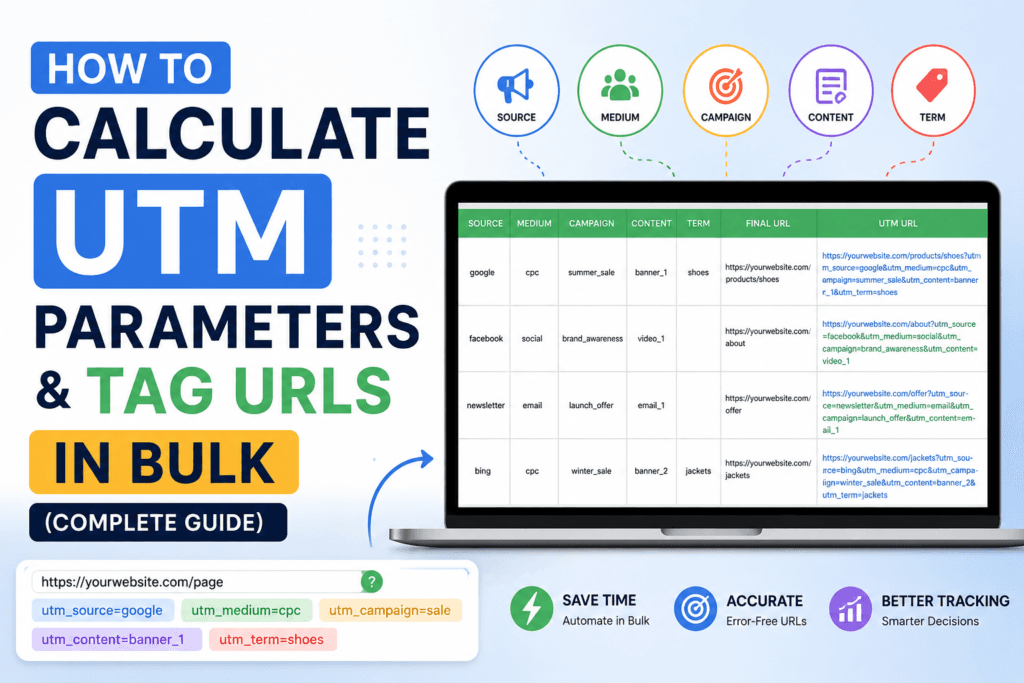
How to Calculate UTM Parameters & Tag URLs in Bulk (Complete Guide)
A practical, no-fluff walkthrough of how UTM tracking actually works — how each parameter is calculated, how to structure it so Google Analytics 4 reads it correctly, and how to tag hundreds of links at once without breaking your reports.
- What a UTM link builder actually does
- How to calculate each UTM parameter
- The five UTM parameters explained
- Step-by-step: building one tagged link
- What bulk URL tagging is and when to use it
- Step-by-step: bulk-tagging a spreadsheet of URLs
- Naming convention cheat sheet
- Manual builder vs. bulk tagging tool
- Common UTM mistakes to avoid
- Reading UTM data inside GA4
- A real multi-channel tagging scenario
- Frequently asked questions
If you have ever looked at your Google Analytics traffic report and seen a wall of “(direct) / (none)” where a real campaign should be, the cause is almost always a missing or malformed UTM tag. This guide breaks down exactly how UTM parameters are calculated, how to build them by hand, and how to tag dozens or hundreds of links at once using a UTM Link Builder so every click in every channel gets attributed correctly.
01What a UTM Link Builder Actually Does
A UTM link builder is a small piece of software that appends a query string — a set of key-value pairs — to the end of a destination URL. Nothing about the destination page changes. The link still opens the same page, loads the same content, and behaves the same way for the visitor. What changes is that your analytics platform can now read the query string and log, for that specific visit, exactly which source, medium, and campaign sent the click.
Without this tag, analytics tools fall back to referrer data, which is unreliable for a lot of real-world traffic: email clients strip referrer headers, native mobile apps often pass no referrer at all, and QR codes, PDFs, and print materials carry no referrer whatsoever. UTM tagging solves this by putting the attribution data directly inside the link itself, so it survives the entire click journey regardless of the channel.
Every dollar of marketing spend you can’t attribute to a channel is a dollar you can’t optimize. UTM tagging is the cheapest, most reliable attribution method available, and it costs nothing but five minutes of consistent naming discipline.
02How to Calculate UTM Parameters (The Actual Formula)
“Calculating” a UTM link isn’t math in the arithmetic sense — it’s a structured formula for assembling text. Once you understand the formula, you can build any UTM link in under a minute, or generate hundreds in a batch. The formula is:
| Component | Rule |
|---|---|
| Base URL | The exact landing page URL, including https:// and any existing path. |
| Separator | A single ? immediately after the base URL, only once. |
| Parameter | Written as key=value — no spaces, lowercase, words joined with underscores. |
| Joiner | An & between every additional parameter after the first. |
| Encoding | Spaces become %20 or +; special characters are percent-encoded automatically by a builder tool. |
Written out, the calculation is: base_url + “?” + param1 + “&” + param2 + “&” + param3 … repeated for however many parameters you’re using. The two required parameters are utm_source and utm_medium; everything else is optional but strongly recommended for anything beyond a single one-off link. Doing this by hand for one link is trivial. Doing it for 60 product pages across five ad platforms is where typos creep in — which is exactly the problem a UTM Link Builder is built to remove, since it assembles and encodes the string for you and validates the result before you copy it out.
03The Five UTM Parameters, Explained With Real Examples
Required. Identifies the specific platform or publisher that sent the traffic — not the type of channel, the actual name.
utm_source=google · utm_source=facebook · utm_source=newsletter_marchRequired. Describes the category of marketing activity — how the link was delivered, not who delivered it.
utm_medium=cpc · utm_medium=email · utm_medium=social · utm_medium=affiliateRecommended. Names the specific initiative the link belongs to, so results from that push can be isolated later.
utm_campaign=black_friday_2026 · utm_campaign=product_launch_q3Optional. Historically used for paid search keywords; many teams now repurpose it for audience segment or targeting detail.
utm_term=running_shoes_men · utm_term=lookalike_1percentOptional. Distinguishes between two links pointing to the same page — different ad creative, button, or email section.
utm_content=banner_top · utm_content=text_link_footerThink of it as who, how, why, what-for, and which-one. Source is who, medium is how, campaign is why, term is what-for (targeting), content is which-one (variant). If you can answer those five questions about a link, you already know its UTM values.
04Step-by-Step: Building One Tagged Link
- Copy the exact destination URL. Pull it straight from the address bar of the live page, including any existing path or subfolder, to avoid a broken redirect.
- Decide the source. Name the specific platform — “instagram,” not “social.” Specificity here is what makes the report useful later.
- Decide the medium. Pick one consistent word for the channel type: cpc, email, social, referral, affiliate, or organic.
- Name the campaign. Use a name you’ll still recognize in a report six months from now — include the initiative and, if relevant, the year or quarter.
- Add term and content only if you need to split results further. Skip them for simple one-off links; they add clutter without value if there’s nothing to differentiate.
- Generate and validate. Paste the pieces into a UTM Link Builder so spacing, casing, and encoding are handled automatically, then test the finished link in a private browser window before sending it live.
05What Bulk URL Tagging Is — And When You Actually Need It
Bulk URL tagging applies the same formula from Section 02 to many destination URLs in one pass, instead of one link at a time. It matters the moment your tagging workload stops being “one email link” and becomes “forty product pages across three ad networks for the same sale.” At that scale, manual tagging isn’t just slow — it’s where inconsistent casing, swapped parameter order, and missing ampersands quietly enter your data and fragment a single campaign into a dozen mismatched rows in your reports.
A bulk URL tagging tool takes a list of destination URLs plus a shared set of campaign values, and produces every finished, correctly formatted link in one export — usually as a downloadable list or spreadsheet, ready to drop into ad platforms, email tools, or a link shortener.
06Step-by-Step: Tagging a Batch of URLs at Once
- Collect every destination URL first. Build the full list — product pages, blog posts, landing pages — before you tag anything, so the campaign values you choose stay consistent across the whole batch.
- Set the shared campaign values once. Source, medium, and campaign name usually stay identical across every link in the batch, since they all belong to the same push.
- Vary only what needs to differ. Use utm_content to distinguish each individual URL or creative variant inside the same campaign, rather than changing the campaign name itself.
- Run the batch through a bulk tagging tool. Paste or upload the URL list alongside the shared parameters so every link is generated and encoded in one consistent pass.
- Spot-check a sample before distribution. Open three or four of the generated links at random to confirm the destination and query string are both correct.
- Export and distribute per channel. Drop the finished links into your ad platform’s bulk upload, your email tool’s merge fields, or your CMS — whichever channel each row belongs to.
Bulk tagging multiplies whatever mistake is in your shared values across every single link in the batch. Double-check spelling and casing on source, medium, and campaign before you generate — fixing one typo across 200 already-distributed links is far more painful than catching it beforehand.
Skip the manual assembly entirely
Toolriz’s UTM Link Builder generates single links instantly and supports tagging multiple URLs with shared campaign values in one pass — no spreadsheet formulas required.
Open the UTM Link Builder →07UTM Naming Convention Cheat Sheet
Consistency is the entire game with UTM tagging. Google Analytics treats Email and email as two different mediums, which silently splits one channel’s data into two rows. Lock in these rules before your team writes a single tag:
| Rule | Do | Avoid |
|---|---|---|
| Casing | utm_source=facebook | utm_source=Facebook |
| Word separator | utm_campaign=fall_sale | utm_campaign=fall sale |
| Medium vocabulary | fixed list: cpc, email, social, referral, affiliate | a new medium name invented per campaign |
| Campaign dating | utm_campaign=q3_launch_2026 | utm_campaign=launch (no timeframe) |
| Abbreviations | Agree on one glossary team-wide | each marketer inventing their own shorthand |
08Manual UTM Builder vs. Bulk URL Tagging Tool
| Factor | Manual / Single Builder | Bulk Tagging Tool |
|---|---|---|
| Best for | One-off email or social post links | Product catalogs, multi-ad-set launches, affiliate lists |
| Setup time | ~1 minute per link | ~5 minutes for the whole batch |
| Consistency risk | Rises with every link created by hand | Low — shared values are applied uniformly |
| Typical output | Single copyable link | Downloadable list of finished links |
| Where to start | UTM Link Builder | UTM Link Builder (batch mode) |
09Common UTM Mistakes That Quietly Break Attribution
“Email” in one link and “email” in another looks identical to a human but creates two separate rows in your report.
Adding UTM parameters to links between pages on your own site overwrites the original session’s attribution data.
Only the first parameter follows a ?; every parameter after that must be joined with &, or the URL breaks.
Raw spaces in a campaign name can truncate the URL or the tracked value depending on the platform reading it.
Without an agreed vocabulary, five marketers invent five versions of “newsletter,” and none of them roll up into one clean report.
10Where UTM Data Shows Up in Google Analytics 4
Once a tagged link is clicked, GA4 stores the parameter values against that session automatically — there’s no extra setup required on the analytics side. You can review the results under Reports → Acquisition → Traffic acquisition, where the default table groups sessions by “Session source / medium.” Switching the primary dimension to “Session campaign” isolates results by your utm_campaign value specifically, which is the fastest way to see whether a single push performed well across every channel it touched.
For a deeper cut — comparing utm_content variants inside the same campaign, for example — build a free-form exploration report and add Session manual term or Session manual ad content as a secondary dimension. This is where a disciplined, consistent tagging structure pays off: every additional dimension you tagged correctly at link-creation time becomes another way to slice performance later, with zero extra work in GA4 itself.
11A Real Multi-Channel Tagging Scenario
Picture a mid-size online retailer running a five-day seasonal sale across email, Meta ads, Google Search ads, an affiliate network, and an SMS blast — six landing pages, five channels, thirty finished links in total. Built by hand, that’s thirty opportunities for a stray capital letter or a missing ampersand. Handled correctly, the team first agreed on shared values: utm_medium fixed per channel (email, cpc, social, affiliate, sms), one utm_campaign value shared across all thirty links (summer_sale_2026), and a unique utm_content per landing page and creative pairing. Every URL was generated in one batch through a bulk tagging pass, spot-checked, and distributed. Two weeks later, the GA4 exploration report cleanly separated all six landing pages under one campaign row, letting the team see — without any manual spreadsheet reconciliation — that the affiliate channel drove the lowest cost-per-click but the SMS blast drove the highest add-to-cart rate. That comparison is only possible because the tagging was consistent from the start.
12Frequently Asked Questions
What is a UTM link builder used for?
A UTM link builder attaches tracking parameters to the end of a URL so analytics platforms like Google Analytics 4 can identify exactly which campaign, channel, or ad sent a visitor to your site, without changing what the visitor actually sees.
How do you calculate UTM parameters correctly?
Define the traffic source, marketing medium, and campaign name as lowercase, underscore-separated values, then append them to your base URL after a single question mark, joining any additional parameters with an ampersand between each pair.
What is bulk URL tagging, exactly?
It’s the process of generating UTM-tagged links for many destination URLs at once — usually by supplying a list of pages plus one shared set of campaign values — instead of building each tracking link individually.
Do UTM parameters hurt SEO or rankings?
No, not when used correctly. Search engines treat the base URL and its canonical version as the indexable page. Issues only arise if tagged URLs are accidentally used in internal navigation or get indexed as duplicate pages, both of which a canonical tag prevents.
Is a UTM link builder tool free to use?
Most UTM link builder tools, including Toolriz’s UTM Link Builder, are free for single links and small batches and don’t require account creation to generate a tagged URL.
What’s the actual difference between utm_source and utm_medium?
utm_source names the specific platform the click came from, such as “google” or “instagram.” utm_medium names the category of channel that delivered it, such as “cpc,” “email,” or “social.” One answers “where,” the other answers “how.”
Should I tag internal links on my own website?
Generally no. Tagging a link a visitor clicks while already on your site overwrites the original session’s source and medium, making it look like the visitor arrived from that internal link instead of wherever they actually came from.
How many links can a bulk URL tagging tool handle at once?
This depends on the specific tool, but most bulk taggers are built to handle anywhere from a handful of URLs up to several hundred in a single batch, which comfortably covers most product catalogs and multi-ad-set campaign launches.